The Hidden Fragility of Fixed-Height Cards: A Developer's Guide to Robust Layouts
Overview
Fixed-height cards are a common pattern in web design. They promise neat, aligned grids and a sense of order. But beneath that tidy surface lies a fragile assumption: that the content will never exceed the allocated vertical space. This tutorial explores why those rigid containers break when content changes—due to translation, font scaling, or dynamic updates—and how to build layouts that adapt gracefully.
Prerequisites
- Basic HTML/CSS: You should be comfortable writing HTML markup and CSS style rules.
- Familiarity with Flexbox/Grid: Understanding how to create a card layout using CSS Grid or Flexbox is helpful.
- Browser DevTools: You'll need a browser with developer tools to inspect and debug layout issues.
- Optional: A basic understanding of accessibility concerns (e.g., font-size scaling) will deepen your insight.
Step-by-Step Guide
1. Understanding the Problem: Why Fixed Heights Fail
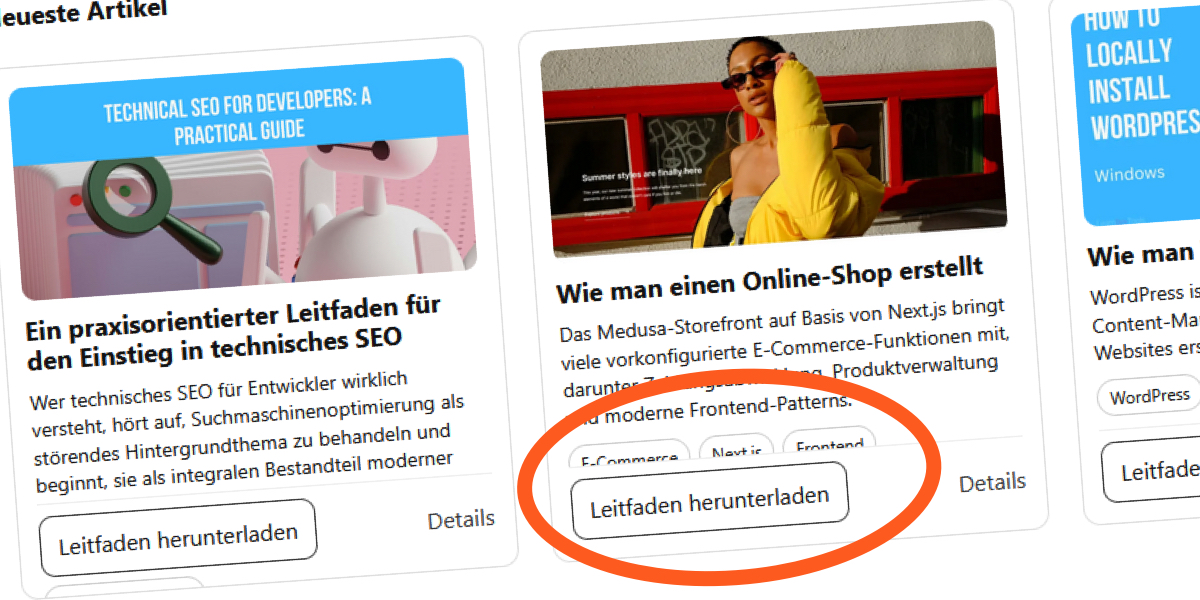
A fixed-height card relies on the container having an exact pixel dimension. In design mockups, titles are short, excerpts fit perfectly, and the layout appears stable. But as soon as the content changes—an editor adds a longer headline, the site is translated to German, or a user increases their default font size—that fixed container can't grow. The browser either clips the overflow or forces elements to collide, breaking the visual harmony. This is especially common for users with low vision or those who enlarge text for readability.
2. The Initial Implementation: Seemingly Solid CSS
Consider a typical card component for a 'Recent Articles' section:
.card__title {
  margin: 0 0 8px;
  font-size: 18px;
  line-height: 1.2;
  display: -webkit-box;
  -webkit-line-clamp: 2;
  -webkit-box-orient: vertical;
  overflow: hidden;
}

.card__excerpt {
  margin: 0 0 10px;
  font-size: 14px;
  line-height: 1.4;
  display: -webkit-box;
  -webkit-line-clamp: 3;
  -webkit-box-orient: vertical;
  overflow: hidden;
}
At first glance, this works perfectly. The line-clamp ensures the title and excerpt truncate at two and three lines respectively. The container's height is fixed (not shown here, but often set via a parent rule). The layout looks solid—until it isn't.
3. Introducing the Vulnerability: When Content Grows
Everything runs smoothly with short English text. But swap the content for a translation like “Les articles récents du blog” (French) or “Die neuesten Beiträge des Blogs” (German), and the words become longer. Combined with font-size scaling—users with low vision often set their browser's default text size to 150% or more—the text inside the fixed container expands. The height remains unchanged. The result? Overlapping elements, truncated text that breaks readability, or empty space that throws off alignment.
I personally encountered this while building a blog section. The design assumed relatively short English titles, so everything fit inside the fixed height. But once the content changed, the cracks started appearing. Translations made things worse, and the layout failed.
4. Making the Problem Visible: Removing the Safety Net
In the initial code, overflow: hidden masks the issue. To demonstrate the fragility, remove that property temporarily:
.card__title {
  display: -webkit-box;
  font-size: 18px;
  line-height: 1.2;
  margin: 0 0 8px;
  -webkit-line-clamp: 2;
  -webkit-box-orient: vertical;
  /* overflow: hidden; */
}

.card__excerpt {
  display: -webkit-box;
  font-size: 14px;
  line-height: 1.4;
  margin: 0 0 10px;
  -webkit-line-clamp: 3;
  -webkit-box-orient: vertical;
}
Without overflow hidden, the failure is no longer subtle. Text overflows its container, overlapping the card's borders or pushing into adjacent cards. This reveals the core issue: the fixed height breaks the natural relationship between content and container. The browser doesn't treat this as an error; it just resolves the conflict by either clipping or allowing overflow.

5. A Robust Alternative: Letting Go of Fixed Heights
The solution is to avoid fixed heights altogether. Instead, use min-height or max-height combined with flexible content. For cards, rely on CSS Grid or Flexbox's natural alignment to keep things tidy without rigid constraints.
- Use
min-heightfor consistency: Set a minimum height so cards don't collapse, but allow them to grow as needed. - Implement
line-clampresponsibly: Keepoverflow: hiddenon the text elements, but ensure the container itself isn't locked to a fixed height. Usemax-heightonly if you must enforce a limit—and pair it withoverflow: autoto avoid clipping. - Leverage alignment properties: In a grid, use
align-items: startto prevent cards from stretching unevenly. This gives you visual harmony without forcing uniform heights. - Test with different content: Simulate translations and font-size changes during development. Zoom the browser to 150% and check how your cards behave.
Alternate approach: If you must have equal-height cards, consider using a technique like display: grid with grid-auto-rows: 1fr or JavaScript-based height equalization. But even then, the container should not be fixed; let it grow with the tallest card.
Common Mistakes
- Assuming content will never change: Designers often supply sample text that is shorter than real-world content. Always ask for worst-case content or at least test with longer strings.
- Relying solely on
overflow: hidden: This hides visual problems but doesn't fix them. Content that overflows is still inaccessible, especially to screen readers. - Ignoring font-size scaling: Many users increase text size for readability. Your cards must accommodate that. Use relative units (
em,rem) and avoid pixel-based heights for content containers. - Using fixed heights on cards in a grid: Even with
line-clampin place, the container's fixed height can cause neighboring cards to misalign when one has more content. - Not testing with translated content: German and Finnish words are often longer than English. A card that works in English may break when localized. Always test with realistic translated text.
Summary
Fixed-height cards seem like a quick win for aligning grids, but they introduce a critical vulnerability: they break when content exceeds the allocated space. By removing fixed heights, using min-height, and letting the container grow naturally, you create layouts that are accessible, resilient, and maintainable. Test thoroughly with varied content and font sizes to catch issues early. The result is a component that adapts, not one that shatters under pressure.
Related Discussions